Use these definitions of common query terms when you build and refine queries in Slate.
Core terminology
Query
A query is a structured question you ask of a database that returns specific information.
Quick Query
A Quick Query is intended for short-term use. Quick Queries are not saved or named by default. To create a named query, save a copy.
Query Library
Use the Query Library to create, save, and reuse custom filters and exports. You can make these filters and exports available to other users.
SQL
SQL stands for Structured Query Language. It is the language used to communicate with a relational database. You do not need to know SQL to create queries in Slate.
Custom SQL
SQL written or generated outside of Slate is considered custom SQL. Use standard query features when they can retrieve the data you need.
Query builder
When you create a query in Slate, you work with the five elements listed below.

Query base
The base of a query fills in the blank in the statement, “I want to see one row per ______.”
Exports
Exports are properties of the rows a query returns. For example, person records have Name, Email, and Birthdate exports. Exports let you retrieve data from a database and format it for the reader.
Filters
Filters limit the rows a query returns to those that meet the specified criteria.
Sorts
Sorts put query results in order based on one or more criteria. For example, you can sort numeric values from highest to lowest or dates from newest to oldest.
Joins
A join connects data from one query base to another. Use a join to filter results from one base by data stored on another base.
For example, a person record can have one or more applications. Application records have their own base and are related to person records. You can join from person to application to filter for person records that have an application.

Data tables and joins
These terms relate to database structure and how tables are joined.
Table
Slate stores and organizes data in tables. These connected tables make up a relational database.
Relational database
A relational database stores data in tables with rows (records) and columns (exports). Defined relationships connect the tables.
Base join / main join
A base join is added at the main query level. It returns at most one related object per row in the starting base. A join within a subquery can return more than one related object per original row.
One-to-one
A one-to-one join connects each row in your query to at most one row in another table.
One-to-many
A one-to-many join can connect each row in your query to multiple rows in another table.
Subquery
A subquery is a query within a query. You can create subquery exports, subquery filters, and subquery joins. Subquery exports and filters are more common.
Dependent subquery
A dependent subquery uses the predefined joins between tables in Slate. These joins connect the subquery to the base of the main query.
Independent subquery
An independent subquery runs on a separately configured base. It lets you work with data that you cannot reach through the predefined joins in Slate.
Row offset
Row offset identifies which related row to select or start with after the subquery applies its filters and sort. A row offset of 1 returns the first matching row, 2 the second, and 3 the third.
Table rank
Table ranking uses set criteria to determine which data points are the most relevant.
Subquery exports
A subquery export retrieves data from the related rows in a one-to-many relationship. It lets you control how that data appears in an export column.
Output
The Output menu determines which function applies to the selected export within your subquery. The output types are listed below.
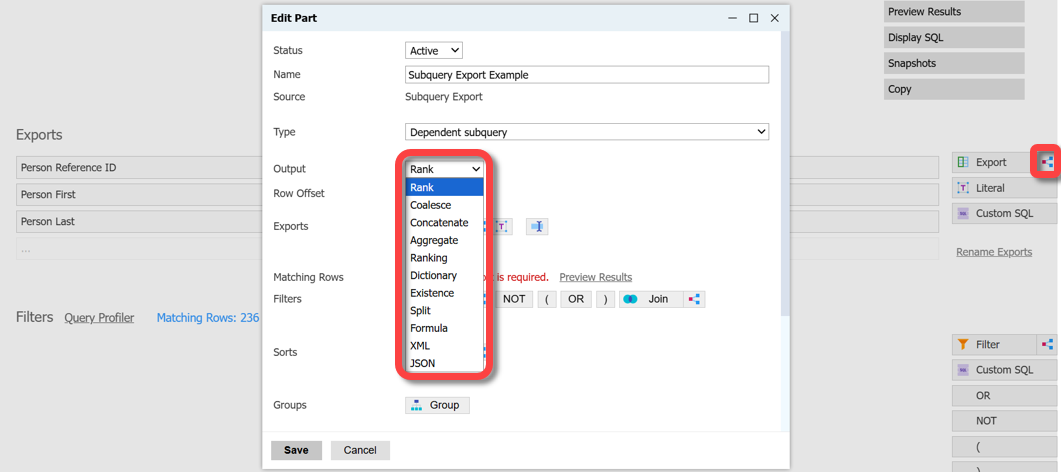
Rank
Return data at a specified rank when multiple entries exist, such as email addresses. Rank 1 has the highest priority.
Coalesce
Return only one of two or more possible exports.
Concatenate
Combine multiple exports.
Aggregate
Perform arithmetic operations on exports and output the result.
Dictionary
Return a formatted array available for Liquid looping.
Split
Return one segment of a string by choosing a separator and a one-based offset.
Existence
Return a specified output when the data meets the existence conditions.
Formula
Use SQL to perform operations on exported values.
XML
Convert data to XML for use in integrations.
JSON
Convert data to JSON for use in integrations.
Subquery filters
A subquery filter uses related rows in a one-to-many relationship to determine which records a query returns.
Aggregate
The Aggregate menu determines which function applies to the selected export within your subquery. The aggregate types are listed below.
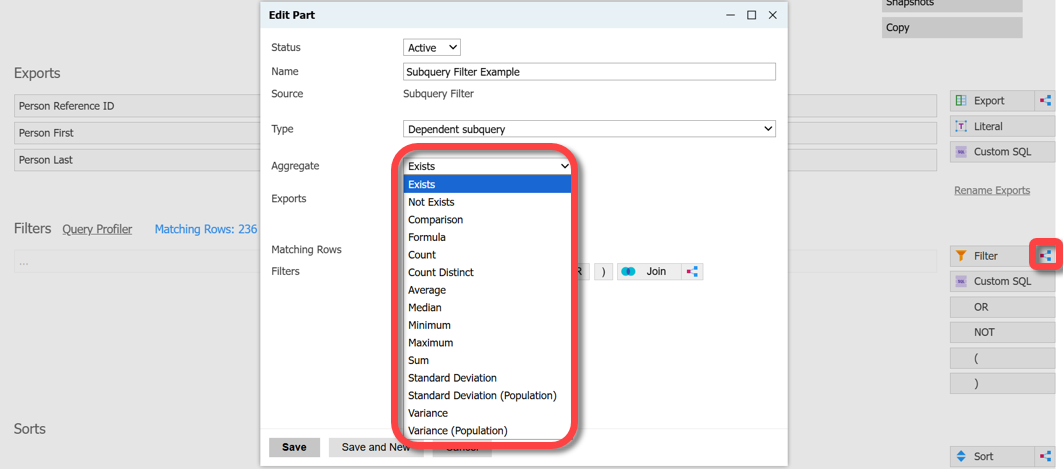
Exists
Limit results based on the existence of a record or value.
Not Exists
Limit results based on the absence of a record or value.
Comparison
Compare two values of the same data type.
Count
Return records based on the specified count of related records or values.
Count Distinct
Return records based on the specified count of unique related records or values. Duplicates are not returned.
Median
Limit rows based on the middle numeric value in a set of values.
Maximum
Limit results based on the maximum selected value.
Minimum
Limit results based on the minimum selected value.
Sum
Evaluate the sum of values from related records or a selected export.
Standard Deviation
Limit rows based on how far a set of values varies from its mean, measured in the same units as the values.
Variance
Limit rows based on how far a set of values varies from its mean, measured in squared units.
Average
Calculate the arithmetic mean for the selected export.