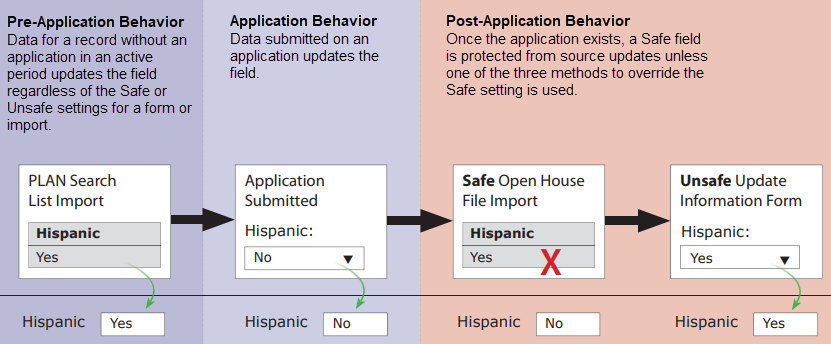
The Safe / Unsafe setting for a custom Person-scoped field determines how the field can be updated if an application in an active period exists for a given Person record.
If a custom Person-scoped field is configured as Safe, the field value is not updated by a safe source import or a safe form submission if the record has an application in an active period.
📝 Note
Standard Person-scoped fields, such as First Name, Last Name, and Date of Birth, are always treated as unsafe.
Because of this, applicant information stored in standard Person-scoped fields will be updated even if an import or form is set to Safe.
You can override the safe field behavior in the following ways:
Setting | Behavior |
|---|---|
Unsafe set on field | Always treats the field as Unsafe, regardless of the settings on the import or the form. |
Unsafe set on form or Unsafe set on import | Treats all mapped fields as Unsafe, regardless of the individual field settings. |
Unsafe set on specific field destination | Treats a specific mapped field as Unsafe, even if the form or import and the field are set as Safe. |
By default, all forms (that are not Application, Application Creation, or Reader-scoped) and custom fields that are not Application-scoped are treated as Safe, unless one of the three methods above is used to override this setting.
For data imports, any data mapped to Application-scoped fields is always treated as Unsafe, and is always imported, regardless of the Safe or Unsafe setting on the import.
Devices and relationship-scoped fields are safe.
Tests and school-scoped fields are unsafe.
In most cases, custom fields should be configured as Safe. Remember, it is possible to override a field’s Safe setting when configuring a form, a source import, or even a specific mapped field destination.
There is no way to override the behavior of a field configured Unsafe (that is, an Unsafe field is always updated regardless of the conditions set on a form or import). Only set a field to be Unsafe if under every circumstance, the data in that field should be updated by a form submission or a source import (such as an SIS ID field).
What the settings mean
For a custom Person-scoped field, think of Safe as protection against replacing applicant data. The protection applies when the person has an application in an active period and the incoming form or import also uses the Safe setting.
Unsafe allows the incoming value to replace the stored value without this protection. The setting can apply to the field, the form or import, or a specific field destination.
Person interactions from Safe source formats
A source format set to Safe can create Person-scoped interactions for applicants who have an application in an active period. Map the interaction data to the standard interaction destinations, including the interaction code and date. These destinations are processed separately from the protected Person field updates.
The import must still match the intended Person record and use a valid interaction code. Existing interaction matching and duplicate checks also apply. You can keep the source format set to Safe when the import needs to add interactions.
Examples
Suppose a person has an application in an active period. Their custom Person-scoped Preferred Campus field contains North Campus.
Keep the stored value: The field and a new form submission are both set to Safe. The submission contains South Campus. Slate keeps North Campus on the person record.
Allow the incoming value: The same field is set to Unsafe. A submission mapped to that field contains South Campus. The field's Unsafe setting permits the update even when the form is set to Safe.
These examples apply to a custom Person-scoped field. The exceptions for standard fields and other scopes are described above.
Example Safe Fields Timeline
The following example describes the timeline for a Hispanic field that is configured as Safe: